
Create a Direct Debit Contact
Direct Debit Contact
This document will guide you through the steps to create a direct debit contact with Zepto.
Important
It is a strict requirement when setting up regular payments via a direct entry that a customer sights and agrees to a Direct Debit Request (DDR) and a Direct Debit Request Service Agreement (DDRSA). Similarly, there are also minimum identification requirements for the on-boarding process, referred to as ‘Know Your Customer', or KYC.
As part of the Direct Debit implementation, integrators are required to collect the required KYC materials and have a DD agreement established between the payment initiator and their customers.
Furthermore, it is highly recommended that the following be in place:
- A process to record & archive the acceptance of the DDR.
- Ensure a printed or non-changeable electronic copy of the DDR and DDRSA can be provided when required within 7 days.
- A refund and dispute policy
- A process of identifying a customer and storing that data securely
Once you have signed up in Sandbox, reach out to your Zepto contact so they can enable the service in your account.
Prior to going live, you will be provided with your unique DD User ID. Speak to your Zepto contact to obtain more information about the process.
Usage Checklist:
Ensure that the DDR and DDRSA are filled and included in the agreement with your customers.
Step 1 - Create a Direct Debit (KYC Trusted) Contact
a. The following endpoint will allow you to achieve three actions simultaneously:
- Create a contact (authoriser).
- Input the bank account details (BSB + Account Number) including any metadata.
- Create the Agreement
Endpoint: POST /agreements/kyc
{
  "authoriser":{
    "name":"John Doe",
    "email":"[email protected]",
    "bank_account":{
      "branch_code":"433444",
      "account_number":"3934342"
    },
    "metadata": {
      "some_data": "stored on the authoriser contact"
    }
  },
  "terms":{
    "per_payout":{
      "min_amount":null,
      "max_amount":null
    },
    "per_frequency":{
      "days":null,
      "max_amount":null
    }
  },
  "metadata":{
    "your_customer_uid": "6041475e-c5b4-4abe-a8e9-e2c3620a0a3e",
    "some_other_data": "stored on the agreement"
  }
}
{
"data":{
"ref":"A.ci",
"initiator_id":"6a0a05c4-8ad9-495d-bcf9-66a7d0046909",
"authoriser_id":"9fa1be8d-40fb-4bf6-9743-577a1d5a3775",
"contact_id":"bea8107a-a5b5-4719-92ec-8389ad7aa619",
"bank_account_id":"91dbef6d-b596-4387-a36c-5a8497822b97",
"status":"accepted",
"responded_at":"2018-04-30T04:43:52Z",
"created_at":"2018-04-30T04:43:52Z",
"terms":{
"per_payout":{
"max_amount":null,
"min_amount":null
},
"per_frequency":{
"days":null,
"max_amount":null
}
},
"metadata":{
"your_customer_uid": "6041475e-c5b4-4abe-a8e9-e2c3620a0a3e",
"some_other_data": "stored on the agreement"
}
}
}b. Record the contact_id against the customer in your system as we will use this to make payment requests.
The request is idempotent to safeguard against accidental duplication. For example, if you POST the same payload, it will return the currently live Agreement.
Updating Bank Account
Some of your customers, over time, will change their bank account and require you to update their account details within your integration. It is important that this is taken into account and planned in advance to ensure a smooth transition for both your customers and yourself.
If your application relies on metadata that you supply when creating an Agreement, a Bank Connection or the Agreement reference, your application will need to remove the Agreement that is in place with this customer, remove the existing Contact and then send a request to the KYC endpoint to create a new Contact and Agreement within Zepto. This ensures that the correct data is persisted in your application and everything is set up and referenced correctly.
If your application does not rely on any of the above-mentioned data, the process is simpler and you can simply follow the steps below:
via API
Endpoint: PATCH /contacts/{id}
{
  "name": "New Name",
  "email": "[email protected]",
  "branch_code": "123456",
  "account_number": "456789"
}
{
"data": {
"id": {id},
"name": "New Name",
"email": "[email protected]",
"type": "Zepto account",
"bank_account": {
"id": {bank_account_id},
"account_number": "456789",
"branch_code": "123456",
"bank_name": "{bank_name}",
"state": "active",
"iav_provider": "zepto",
"iav_status": "active",
"blocks": {
"debits_blocked": false,
"credits_blocked": false
}
},
"bank_connection": {
"id": "1030bfef-cef5-4938-b10b-5841cafafc80"
}
}
}The above request will change the details of the contact referenced by the id in the endpoint URL. You are able to specify multiple fields to change, as done above, or a single field should you only want to change that field.
via UI
You are able to change your contact's Bank details using your Zepto account user interface. Follow these simple steps to successfully update a BSB and Account Number for your contact.
- Log into your Zepto Account.
- Click on the Contacts from on the lefthand menu on your dashboard.
- Locate the Contact you wish to edit and click on their blue reference number.
- Click on the green Edit button in the top right of this page.
- On this page, you are able to enter a new BSB and Account Number for this Contact.
- Once the new numbers have been entered click on the green Change Bank Account button
This should take you to your Contacts page again with a green success message stating that the contact was updated.
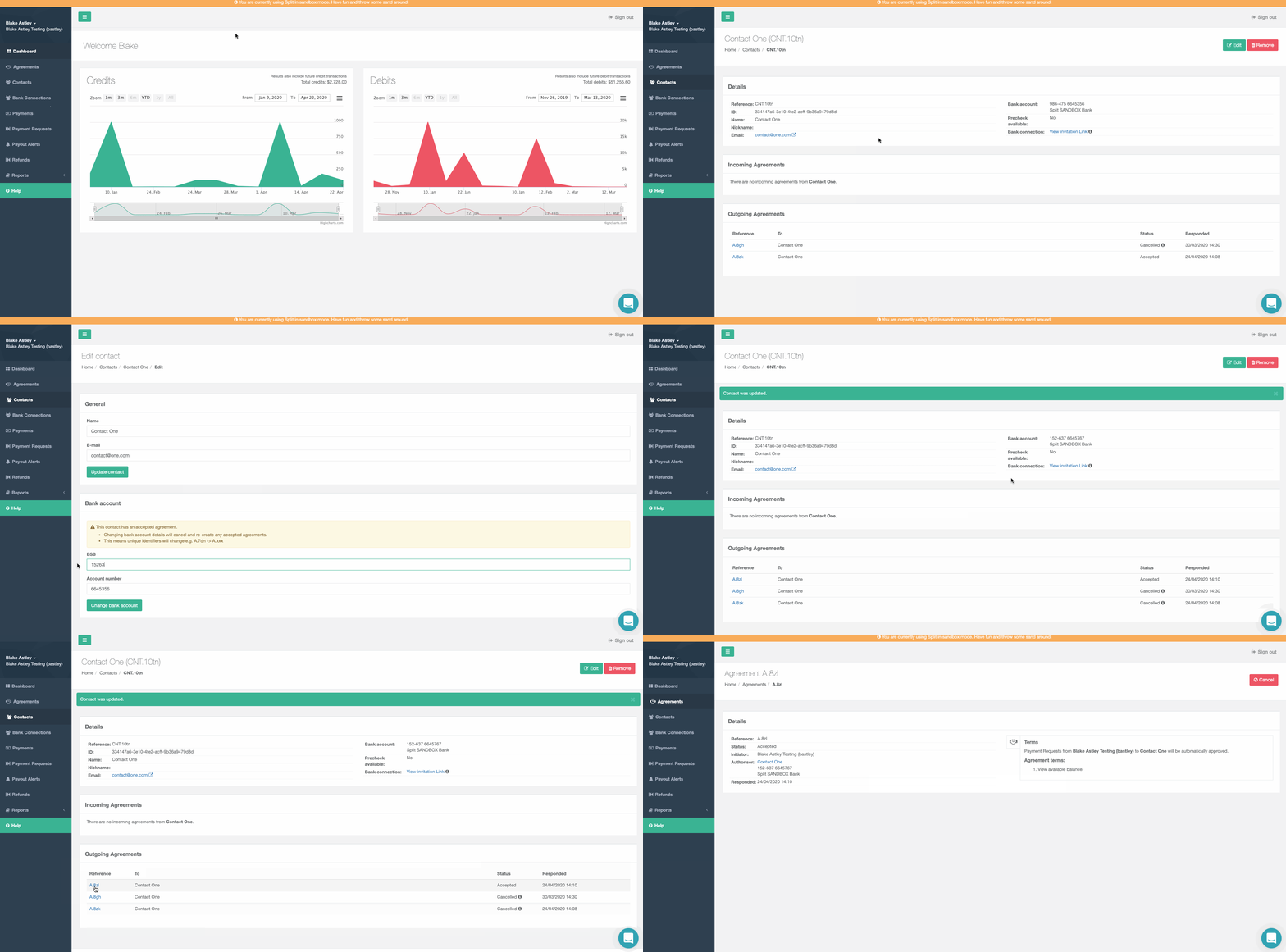
Keep in mind that changing a contact's Bank Account will remove the existing Agreement that is in place between you and this Contact and create a new identical one in its place. If your integration uses an Agreements reference number, A.xxxx for any reason, this reference will need to be updated to this new Agreements reference.
Updated 7 months ago