
Setting up your webhooks
This article will guide you on how to setup and subscribe to Zepto webhook events.
Setting up your webhooks
This article will guide you on how to setup and subscribe to Zepto webhook events.
Webhooks are used to notify your application of changes to the status of Agreements, Payment Requests, Credits and Debits, etc as they are processed through the system.
By subscribing to our webhook events you can monitor the status of each transaction, and then trigger the appropriate next steps.
Webhook Pal
You can use Webhook Pal to quickly create a webhook site to test and design your webhook flows.
Webhook Types
Owner
These webhooks are managed by the owner of the Zepto account and only report on events relating to the Zepto account.
To create an Owner webhook:
- Once you're logged into your Zepto account, click on your name at the top left of the interface
- Within the drop down menu displayed, click Webhooks
- Click on the green + Webhook button found on the top right of the screen
Application
These webhooks are managed by the Zepto OAuth2 application owner and will report on events relating to any authorised Zepto account (limited by scope)
To create an Application webhook:
- Once you're logged into your Zepto account, click on your name at the top left of the interface
- Within the drop down menu displayed, click on Your applications
- Click on one of your applications, then click on the green + Webhook button
<Zepto_Callout type="tip" title="Tip" id="tip-callout">
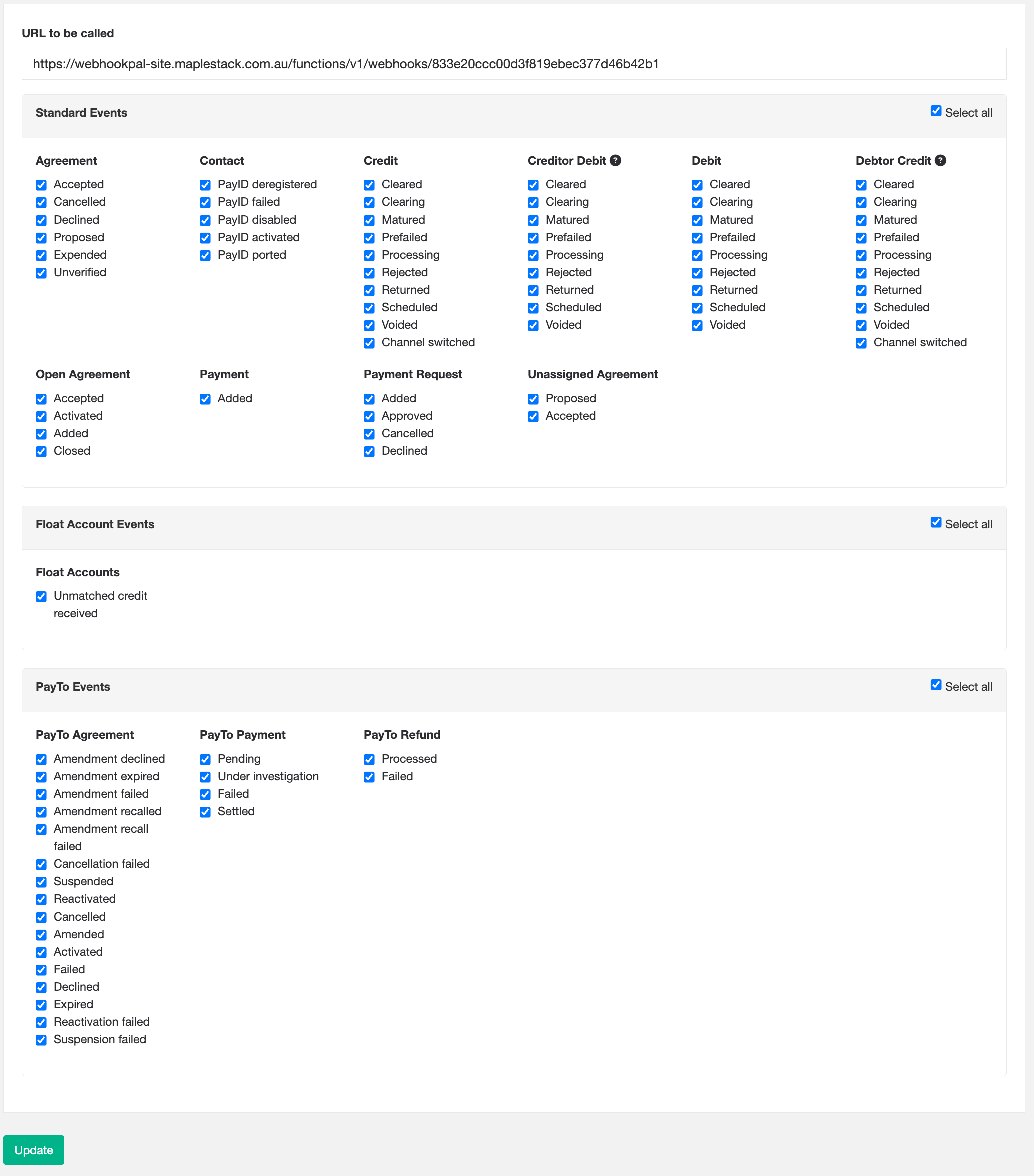
We recommend you subscribe to all the events to begin with when testing in Sandbox and unsubscribe the ones you deem you do not need as you go.
</Zepto_Callout>
Webhook Event Payload
A typical webhook event follows this structure:
{
  "event": {
    "type": "object.action",
    "at": "yyyy-mm-ddThh:mm:ssZ",
    "who": {
      "account_id": "x",
      "bank_account_id": "x"
    }
  },
  "data": [{}]
}
Each webhook event contains data relating to its event type. For example, when you receive an Agreement event, the payload will contain data relating to that agreement. The webhook payload will also include metadata where available.
The webhook payload's top-level fields are defined as follows:
| Name | Type | Required | Description |
|---|---|---|---|
event | object | true | Webhook event details |
» type | string | true | The webhook event key (list available in the webhook settings) |
» at | string(date-time) | true | When the event occurred |
» who | object | true | Who the webhook event relates to |
»» account_id | string(uuid) | true | The Zepto account who's the owner of the event |
»» bank_account_id | string(uuid) | true | The above Zepto account's bank account |
data | [object] | true | Array of response bodies |
Note: that the data payload for a single webhook event contains an array that may hold more than one transaction, so you'll need to loop through them all.
Data schemas for data component
data componentUse the following table to discover what type of response schema to expect for for the data.[{}] component of the webhook delivery, based on the event.type.
| Event | Data schema |
|---|---|
agreement.* | GetAnAgreementResponse |
contact.* | GetAContactResponse |
credit.* | ListAllTransactionsResponse |
creditor_debit.* | ListAllTransactionsResponse |
debit.* | ListAllTransactionsResponse |
debtor_credit.* | ListAllTransactionsResponse |
open_agreement.* | ListAllOpenAgreementsRespose |
payment.* | GetAPaymentResponse |
payment_request.* | GetAPaymentRequestResponse |
unassigned_agreement.* | GetAnUnassignedAgreementResponse |
The best way to see example payloads for each type of webhook event is to try them out in the developer sandbox by creating a webhook and subscribing to all events.
If your application is not ready to receive webhooks but you want a quick way to see the events in action, you can use Webhook Pal to quickly create a URL that you can use as the webhook URL when setting up webhooks in Zepto. Alternatively, you can also use ngrok.com to allow webhook events to be posted to your local machine.
Once you have subscribed to all events, you can try creating an Agreement, Payment Request or Payment in the sandbox. You can then see the events that have been sent to the configured webhook URL under the Deliveries heading on the webhook detailed page.
Our Delivery Promises
- We only consider a webhook event delivery as failed if we don't receive any http response code (2xx, 4xx, 5xx, etc.)
- We will auto-retry failed deliveries every 5 minutes for 1 hour.
- Note: In the sandbox environment, webhook deliveries will only be retried once, to allow for easier testing of failure scenarios.
- Delivery order for webhook events is not guaranteed.
- We guarantee at least 1 delivery attempt.
Request ID
Zepto provides a Split-Request-ID header in the form of a UUID which uniquely identifies a webhook event. If the webhook event is retried/retransmitted by Zepto, the UUID will remain the same. This allows you to check if a webhook event has been previously handled/processed.
Example header
Split-Request-ID: 07f4e8c1-846b-5ec0-8a25-24c3bc5582b5Checking Webhook Signatures
Zepto signs the webhook events it sends to your endpoints. We do so by including a signature in each event's Split-Signature header. This allows you to validate that the events were indeed sent by Zepto.
Before you can verify signatures, you need to retrieve your endpoint's secret from your Webhooks settings. Each endpoint has its own unique secret; if you use multiple endpoints, you must obtain a secret for each one.
The Split-Signature header contains a timestamp and one or more signatures. All separated by . (dot).
Example header
Split-Signature: 1514772000.93eee90206280b25e82b38001e23961cba4c007f4d925ba71ecc2d9804978635Step 1. Extract the timestamp and signatures from the header
Split the header, using the . (dot) character as the separator, to get a list of elements.
| Element | Description |
|---|---|
timestamp | Unix time in seconds when the signature was created |
signature | Request signature |
other | Placeholder for future parameters (currently not used) |
Step 2: Prepare the signed_payload string
You achieve this by concatenating:
- The timestamp from the header (as a string)
- The character
.(dot) - The actual JSON payload (request body)
Step 3: Determine the expected signature
Compute an HMAC with the SHA256 hash function. Use the endpoint's signing secret as the key, and use the signed_payload string as the message.
Step 4: Compare signatures
Compare the signature in the header to the expected signature. If a signature matches, compute the difference between the current timestamp and the received timestamp, then decide if the difference is within your tolerance.
To protect against timing attacks, use a constant-time string comparison to compare the expected signature to each of the received signatures.
Here are code examples for verifying signatures:
package main

import (
	"crypto/hmac"
	"crypto/sha256"
	"strings"
	"fmt"
	"encoding/hex"
)

func main() {
	secret := "1234"
	message := "full payload of the request"
	splitSignature := "1514772000.f04cb05adb985b29d84616fbf3868e8e58403ff819cdc47ad8fc47e6acbce29f"

	data := strings.Split(splitSignature, ".")
	timestamp, givenSignature := data[0], data[1]

	signedPayload := timestamp + "." + message

	hash := hmac.New(sha256.New, []byte(secret))
	hash.Write([]byte(signedPayload))
	expectedSignature := hex.EncodeToString(hash.Sum(nil))

	fmt.Println(expectedSignature)
	// f04cb05adb985b29d84616fbf3868e8e58403ff819cdc47ad8fc47e6acbce29f
	fmt.Println(givenSignature)
	// f04cb05adb985b29d84616fbf3868e8e58403ff819cdc47ad8fc47e6acbce29f
}
import hashlib
import hmac
split_signature = '1514772000.f04cb05adb985b29d84616fbf3868e8e58403ff819cdc47ad8fc47e6acbce29f'
secret = bytes('1234').encode('utf-8')
message = bytes('full payload of the request').encode('utf-8')
data = split_signature.split('.')
timestamp = data[0]
given_signature = data[1]
signed_payload = timestamp + '.' + message
expected_signature = hmac.new(secret, signed_payload,
digestmod=hashlib.sha256).hexdigest()
print(expected_signature)
# > f04cb05adb985b29d84616fbf3868e8e58403ff819cdc47ad8fc47e6acbce29f
print(given_signature)
# > f04cb05adb985b29d84616fbf3868e8e58403ff819cdc47ad8fc47e6acbce29frequire 'openssl'
split_signature = '1514772000.f04cb05adb985b29d84616fbf3868e8e58403ff819cdc47ad8fc47e6acbce29f'
secret = '1234'
message = 'full payload of the request'
timestamp, given_signature, *other = split_signature.split('.')
signed_payload = timestamp + '.' + message
expected_signature = OpenSSL::HMAC.hexdigest('sha256', secret,
signed_payload)
puts(expected_signature)
# => f04cb05adb985b29d84616fbf3868e8e58403ff819cdc47ad8fc47e6acbce29f
puts(given_signature)
# => f04cb05adb985b29d84616fbf3868e8e58403ff819cdc47ad8fc47e6acbce29fvar crypto = require("crypto");
var message = "full payload of the request";
var secret = "1234";
var splitSignature = "1514772000.f04cb05adb985b29d84616fbf3868e8e58403ff819cdc47ad8fc47e6acbce29f";
var data = splitSignature.split(".");
var timestamp = data[0];
var givenSignature = data[1];
var signedPayload = timestamp + "." + message;
var expectedSignature = crypto
.createHmac("sha256", secret)
.update(signedPayload)
.digest("hex");
console.log(expectedSignature);
// f04cb05adb985b29d84616fbf3868e8e58403ff819cdc47ad8fc47e6acbce29f
console.log(givenSignature);
// f04cb05adb985b29d84616fbf3868e8e58403ff819cdc47ad8fc47e6acbce29f<?php
$split_signature = '1514772000.f04cb05adb985b29d84616fbf3868e8e58403ff819cdc47ad8fc47e6acbce29f';
$secret = '1234';
$message = 'full payload of the request';
list($timestamp, $given_signature, $other) = explode('.', $split_signature);
$signed_payload = $timestamp . "." . $message;
$expected_signature = hash_hmac('sha256', $signed_payload, $secret, false);
echo $expected_signature;
// f04cb05adb985b29d84616fbf3868e8e58403ff819cdc47ad8fc47e6acbce29f
echo "\n";
echo $given_signature;
// f04cb05adb985b29d84616fbf3868e8e58403ff819cdc47ad8fc47e6acbce29f
?>import javax.crypto.Mac;
import javax.crypto.spec.SecretKeySpec;
class Main {
public static void main(String[] args) {
try {
String splitSignature = "1514772000.f04cb05adb985b29d84616fbf3868e8e58403ff819cdc47ad8fc47e6acbce29f";
String secret = "1234";
String message = "full payload of the request";
String[] data = splitSignature.split("\\.");
String timestamp = data[0];
String givenSignature = data[1];
String signedPayload = timestamp + "." + message;
Mac sha256_HMAC = Mac.getInstance("HmacSHA256");
SecretKeySpec secret_key = new SecretKeySpec(secret.getBytes(), "HmacSHA256");
sha256_HMAC.init(secret_key);
String expectedSignature = javax.xml.bind.DatatypeConverter.printHexBinary(sha256_HMAC.doFinal(signedPayload.getBytes())).toLowerCase();
System.out.println(expectedSignature);
// f04cb05adb985b29d84616fbf3868e8e58403ff819cdc47ad8fc47e6acbce29f
System.out.println(givenSignature);
// f04cb05adb985b29d84616fbf3868e8e58403ff819cdc47ad8fc47e6acbce29f
}
catch (Exception e){
System.out.println("Error");
}
}
}Note: The sandbox environment allows both HTTP and HTTPS webhook URLs. The live environment however will only POST to HTTPS URLs.
Updated 3 months ago