
Making a Payment Request (Direct Debit)
Webhooks are used to notify your application of changes to the status of Agreements, Payment Requests, Credits, Debits, etc as they are processed through the system.
By subscribing to our webhook events you can monitor the status of each transaction, and then trigger the appropriate next steps. While making Payments and Payment Requests, webhooks allow you to check the status of the transactions.
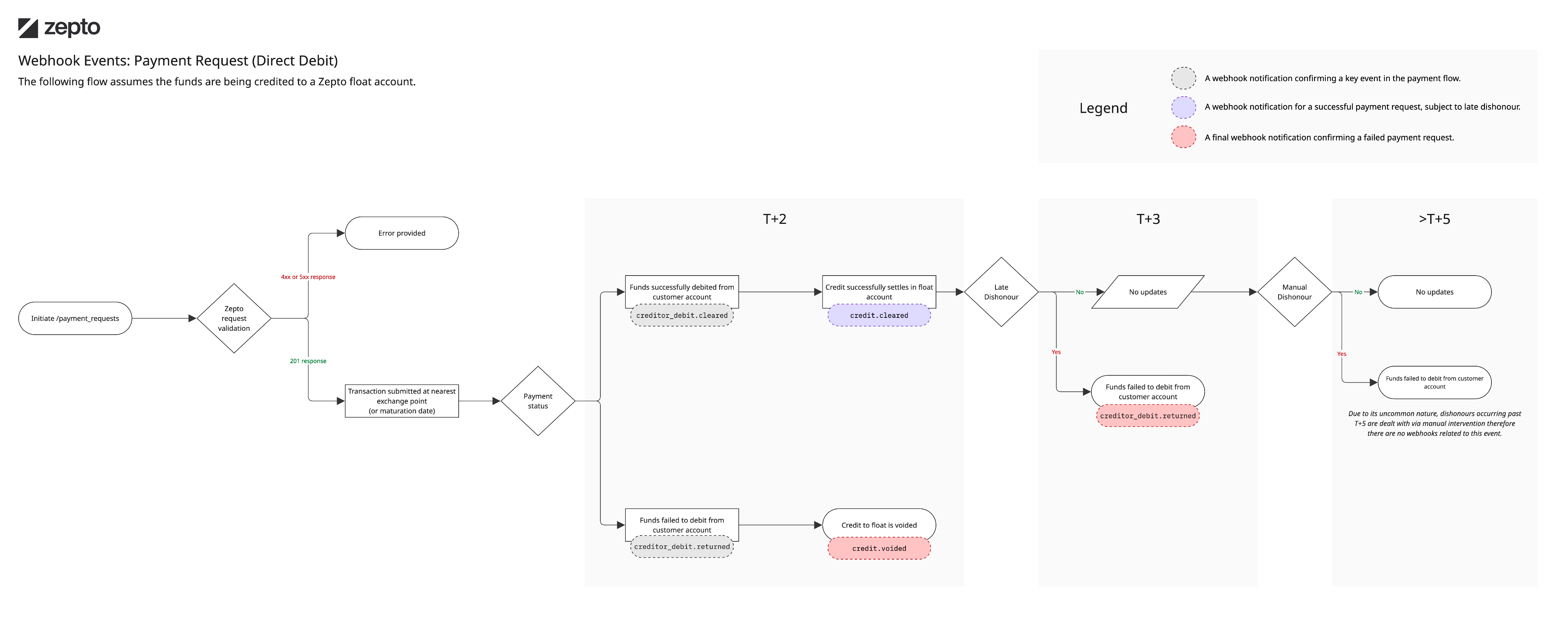
This article gives an overview of the webhook events you would expect to receive for the following scenarios.
Making a Payment Request
Keep the data.ref from the original api call response as the subsequent webhook notifications will be associated with this reference in the parent_ref field. The ref will look like PR.xxxx.
Scenario: Successful
A payment request goes through the following event cycle:
payment_request.addedpayment_request.approvedcredit.scheduledcreditor_debit.scheduledcreditor_debit.maturedcreditor_debit.processingcreditor_debit.clearingcreditor_debit.clearedcredit.maturedcredit.processingcredit.clearingcredit.cleared- (Funds have settled into your nominated bank account)
Scenario: Unsuccessful
While requesting the payment, in any case, if the payment request fails due to incorrect BSB, account number, insufficient funds, etc, the webhooks that will be fired are:
payment_request.addedpayment_request.approvedcredit.scheduledcreditor_debit.scheduledcreditor_debit.maturedcreditor_debit.processingcreditor_debit.clearingcreditor_debit.returned- (Debited funds were returned back to the end customer's account)credit.voided- (the credit to your account will be canceled as the debit was unsuccessful)
The key final states for a direct debit transaction are:
credit.clearedcreditor_debit.returnedcredit.voided
Visual flow
Updated 6 months ago