
Making a Payment (PayOut)
Webhooks are used to notify your application of changes to the status of Agreements, Payment Requests, Credits, Debits, etc as they are processed through the system.
By subscribing to our webhook events you can monitor the status of each transaction, and then trigger the appropriate next steps. While making Payments and Payment Requests, webhooks allow you to check the status of the transactions.
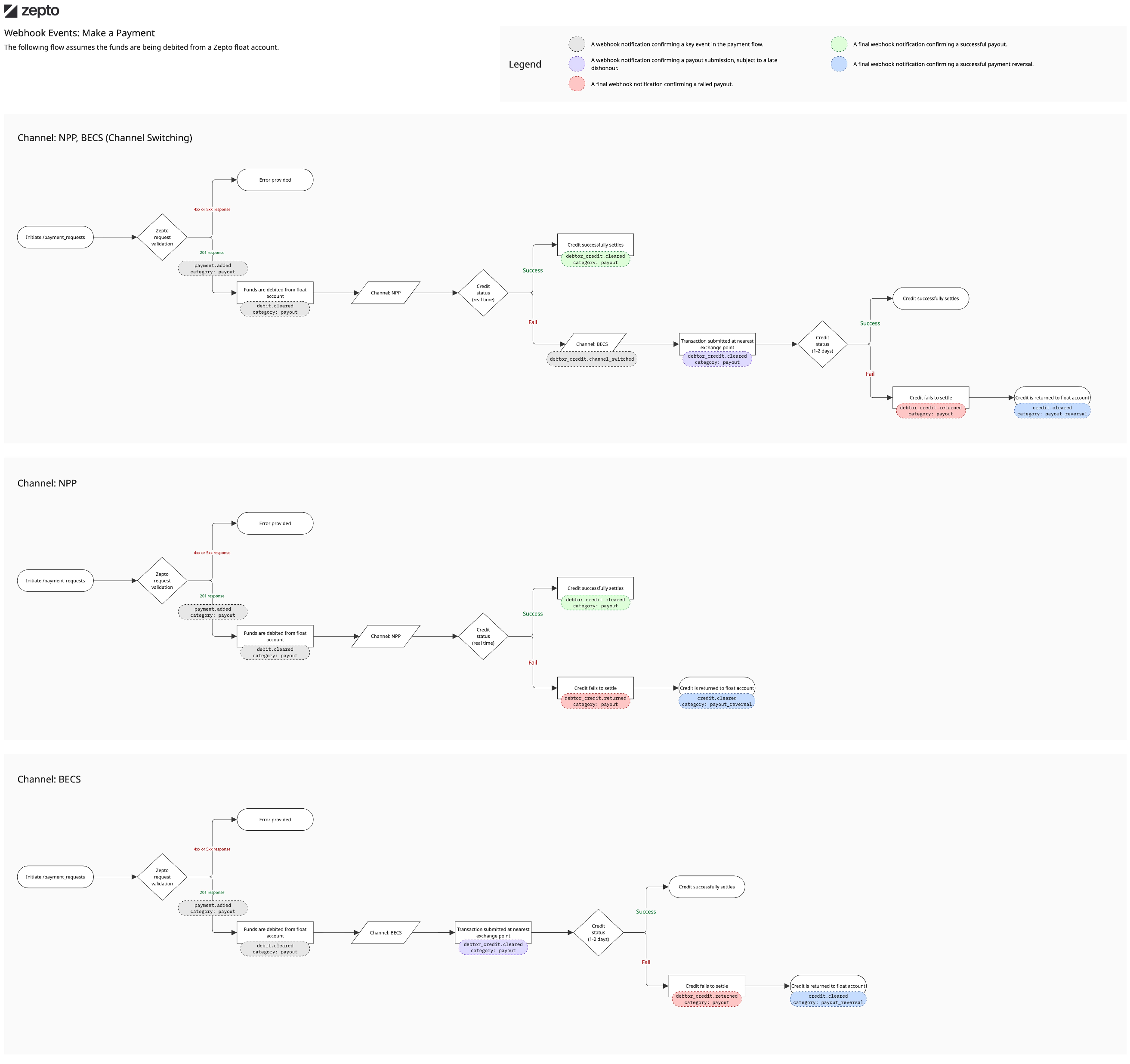
This article gives an overview of the webhook events you would expect to receive for the following scenarios.
Making a Payment
Keep the data.ref from the original api call response as the subsequent webhook notifications will be associated with this reference in the parent_ref field. The ref will look like PB.vhjt.
via NPP
Scenario: Successful
The webhooks that are fired when you make a payment (from your primary account or the float account) are as follows:
payment.addeddebit.scheduleddebtor_credit.scheduleddebit.maturingdebit.matureddebit.processingdebit.clearingdebit.cleareddebtor_credit.matureddebtor_credit.processingdebtor_credit.clearingdebtor_credit.cleared- (Funds were credited into the end customer's account)
For a successful NPP transaction, the final event that the system will fire is debtor_credit.cleared. Please note, that the above webhooks will be fired under the category payout
Scenario: Unsuccessful (with no channel switch to DE)
If you chose a standard Float account (with only NPP transactions or only DE), you would expect to receive the following webhooks:
payment.addeddebit.scheduleddebtor_credit.scheduleddebit.maturingdebit.matureddebit.processingdebit.clearingdebit.cleareddebtor_credit.matureddebtor_credit.processingdebtor_credit.clearingdebtor_credit.returned- (Funds will be returned back to your account)
Since the debit side of the transaction was successful, the credit will be reversed back into the original bank account. The below events will then be fired, under the category payout_reversal.
credit.scheduledcredit.maturedcredit.processingcredit.clearingcredit.cleared- (Funds have been returned to your account)
{
  "data": [
    {
      "ref": "C.2v404",
      "type": "credit",
      "amount": 103,
      "status": "cleared",
      "bank_ref": "CT.2ofh9",
      "category": "payout_reversal",
      "channels": [
        "float_account"
      ],
      "cleared_at": "2025-12-15T02:58:44Z",
      "created_at": "2025-12-15T02:58:43Z",
      "matures_at": "2025-12-15T02:58:43Z",
      "parent_ref": "PB.vhjt",
      "party_name": "Sujeet & Co.",
      "description": "Payout reversal of D.2mrc5 for Sujeet Shrestha due to Account closed",
      "party_bank_ref": "DT.61uw8",
      "party_nickname": "sujeets_au",
      "bank_account_id": "0197a14d-209f-7540-a059-22202fc8c031",
      "current_channel": "float_account",
      "party_contact_id": null,
      "reversal_details": {
        "source_debit_ref": "D.2mrc5",
        "source_credit_failure": {
          "code": "E103",
          "title": "Account Closed",
          "detail": "The target account is closed."
        },
        "source_credit_failure_reason": "account_closed"
      },
      "status_changed_at": "2025-12-15T02:58:44Z"
    }
  ],
  "event": {
    "at": "2025-12-15T02:58:44Z",
    "who": {
      "account_id": "2bdcc210-072d-4e09-b90e-757be5bd9853",
      "account_type": "Account",
      "bank_account_id": "0197a14d-209f-7540-a059-22202fc8c031",
      "bank_account_type": "BankAccount"
    },
    "type": "credit.cleared"
  }
}
So, in summary the key final state events are:
debtor_credit.cleareddebtor_credit.returnedcredit.cleared- (category payout_reversal)
Scenario: Unsuccessful via NPP (but successfully processed via DE after channel switching)
If you chose an NPP hybrid account, failed NPP payments are retried via DE, you would expect to receive the following webhooks:
payment.addeddebit.scheduleddebtor_credit.scheduleddebit.matureddebit.processingdebit.clearingdebit.cleareddebtor_credit.matureddebtor_credit.processingdebtor_credit.channel_switched- (Funds are being sent via the BECS channel)debtor_credit.processingdebtor_credit.clearingdebtor_credit.cleared- (Funds have been sent to the end customer's bank and marked as cleared on the Zepto dashboard.)
Note
For DC transactions, the cleared webhook does not guarantee that the funds have been settled into the end customer's account. The end customer's bank can take a few hours to settle the funds in the associated bank account.
It has been previously noticed, that for a Direct Credit transaction, the banks can get back to us after a day or two, informing us that the credit to the end customer's account has failed due to various reasons (eg: bank account closed).
In this case, our system will trigger another webhook event with the category payout_reversal. The event flows are outlined in the scenario above.
via Direct Entry (Direct Credit)
Scenario: Successful
The webhooks that are fired when you make a payment (from your primary account or the float account) are as follows:
payment.addeddebit.scheduleddebtor_credit.scheduleddebit.maturingdebit.matureddebit.processingdebit.clearingdebit.cleareddebtor_credit.matureddebtor_credit.processingdebtor_credit.clearingdebtor_credit.cleared- (Funds were credited into the end customer's account)
Scenario: Unsuccessful
If you chose a standard Float account, you would expect to receive the following webhooks:
payment.addeddebit.scheduleddebtor_credit.scheduleddebit.maturingdebit.matureddebit.processingdebit.clearingdebit.cleareddebtor_credit.matureddebtor_credit.processingdebtor_credit.clearingdebtor_credit.cleareddebtor_credit.returned- (Funds will be returned back to your account)
Note
Our system would mark the credit as cleared for a DC transaction based on the nearest available exchange point. The banks can get back to us within one or two business days informing us that the credit failed due to any reason. In this case, the final debtor_credit.returned event will be fired.
Since the debit side of the transaction was successful, the credit will be reversed back into the original bank account. The below events will then be fired, under the category payout_reversal.
credit.scheduledcredit.maturedcredit.processingcredit.clearingcredit.cleared- (Funds have been returned to your account)
Direct Credit Late Return Scenario
Overview
Overview
In some rare cases, a Direct Credit payment may be returned by the receiving financial institution several days after it has been successfully sent.
Note
Ensure that you have subscribed to the Unmatched credit received event in your webhook settings so you can receive these events.
When can this happen?
This may occur when the receiving institution accepted the Direct Credit but later decided to return the funds.
Unexpected/unmatched payment
The receiving institution bank account holder did not expect or cannot match the payment.
Account restrictions
The destination account was placed under restrictions after the payment was received.
Operational or compliance review
The payment may be returned following an operational, regulatory or compliance review.
How the return credit is processed
Payment sent
You send a Direct Credit payment funded from your float account.
Payment received
The receiving financial institution accepts the outbound Direct Credit.
Funds returned
The institution sends a new Direct Credit to the original account.
Return credited
Zepto matches the return and credits your designated float account.
Funds will be credited to the original funding float account
Unless the Suspense role has been assigned, Zepto credits the funds to your float account that funded the original Direct Credit.
Assigning the Suspense role
You may assign the Suspense role to one of your float accounts.
Assigning the role does not create a new bank account or change the underlying account type. It defines where Direct Credit Late Returns will be settled.
Default destination
Configured destination
Only one float account can hold the Suspense role at a time.
Assigning the role to a different float account automatically moves it from the previous account.
Outbound Direct Credits continue to use their normal funding float accounts.
Eligibility requirements
The Suspense role can only be assigned to a float account.
The account must be a float account. Regular external bank accounts are not eligible.
Receivable float accounts cannot hold the Suspense role.
Assign the role in the Zepto Portal
Only users with the Owner or Admin role can assign the Suspense role to a float account.
Sign in to the Zepto Portal and select Settings.
Open the list of configured bank accounts.
Select the float account that should receive the late returned Direct Credits.
Open the Actions menu, select Use for Suspense and confirm the change.
The Use for Suspense action is only displayed for eligible float accounts. A Zepto administrator can also assign or remove the role on your behalf.
Webhook notification and reconciliation
Late returned Direct Credits are surfaced as unmatched credits received to your float account.
float_accounts.unmatched_credit.received
Consume this webhook to identify and reconcile late returned Direct Credit funds credited to your float account.
Webhook delivery
The return is surfaced through
float_accounts.unmatched_credit.received.
/transactions endpoint
The direct credit late return is not currently available within the transactions endpoint.
Integrations that reconcile payments using the
/transactions endpoint must also consume the
float_accounts.unmatched_credit.received webhook to detect
late returned Direct Credits.
Example: SuperStream contribution return
A Super fund may return a contribution when it cannot match the received payment to the intended member.
Contribution submitted
The merchant submits a SuperStream contribution funded through an outbound Direct Credit.
Direct Credit sent
Zepto sends the contribution to the Super fund or its receiving financial institution.
Contribution cannot be matched
The receiving organisation is unable to associate the payment with the intended member contribution.
Funds are returned
The receiving institution initiates a new Direct Credit to the source of the original payment.
Return matched and credited
Zepto matches the return and credits either the original funding float account or the float account designated as Suspense.
Webhook delivered
Zepto sends the
float_accounts.unmatched_credit.received webhook so
you can reconcile the returned funds.
Direct Credit late return summary
The original outbound payment must be a Direct Credit.
The receiving institution may return funds several days later.
Funds return to the float account that funded the original payment.
Assign the Suspense role to an eligible float account.
Detect the return through the unmatched credit received webhook.
The webhook notification can be used for your reconciliation purposes.
Visual flow
Updated 3 months ago